Today ProSyst released the beta version of mBS for Android. mBS is the leading OSGi implementation in the embedded market. The beta release of the Android version is available from ProSyst Developer Zone. This release is under ProSyst Non-Commercial License, which permits free use for non-commercial trials.
Why to use OSGi on top of Android?
OSGi and Android are both component platforms. However, due to the differences discussed in an earlier post about Android, there are significant benefits in using OSGi on top of Android:
- Lack of class-sharing: Android doesn't support the class sharing between application packages, which leads to class duplication between components of a modularly deployable application. Such class duplication puts high burden on platform maintenance as well if there are shared components.
- Fine-grained components: in Android, component communication involves interprocess communication which leads to coarse-grained components with high abstraction-level interfaces. The efficient communication between OSGi components - i.e. direct method calls - permits a much finer grained decomposition. The fine-grained component model enables plugin architectures like in Eclipse eRCP.
- Device Management: Remote manageability is an essential feature both for enterprises and mobile operator. Android currently doesn't include this feature, but OSGi offers an out of the box solution for this are.
Release Content and Requirements
Content of the release:
- mbs.apk - mBS for Android
- mconsole-proff-6.1.41-19-12-2007.zip - ProSyst mConsole remote management tool
- demo.zip - Bundles demonstrating the use of OSGi services on top of Android
- readme.htm - Detailed installation instruction for the release and the demos
- ProSyst Non-Commercial license.txt
mBS for Android
The mbs.apk package contains the mBS distribution as an Android application package. It can be directly deployed to Android using the adb tool. The product can then be found under the All desktop item.
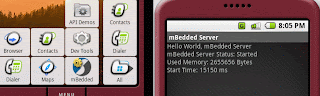
This mBS distribution contains the full OSGi R4 framework implementation and the following services:

|
- Configuration Admin
- IO Connector
- Console
- Data store (db.jar)
- Device Manager
- HTTP Service
- Servlet API
- Kit Installation Manager
- Log Service(log.jar)
- Metatype Service
- ProSyst Message Protocol
- Initial Provisioning Service
- ProSyst Utility Package
- Socket Connection Service
- Telnet Console
- User Admin Service
- Remote User Administration support
|
The mBS port works with Android M5 or later as it depends on some bugfixes introduced in the M5 release.
mConsole
The mconsole-proff-6.1.41-19-12-2007.zip contains ProSyst mConsole, a remote management console that allows the management of OSGi framework. This package can be installed to a PC and it can be used to remotely manage the OSGi framework running on Android. This version of mConsole uses the ProSyst Management Protocol for the management but other management protocols are supported as well. Using the management console allows:
- Installing/updating a bundle to the framework
- Uninstalling bundles
- Starting/stopping bundles
mConsole runs on Windows-based PCs.

Porting Experience
Porting Java applications to Android, if it doesn't involve the porting of UI should be easy. However, during the technical work, ProSyst team had to face some challenges due to some bugs in Android and the lack of documentation for the Dalvik Virtual Machine. The major issues are described here to help the work of other porting projects:
Stack Size
By default the stack size of the Dalvik VM is set to 1 KB. Which was a bit few when starting mBS with a large number of bundles. The stack size can be set using the -Xss command line argument. For example -Xss65536 sets the stack size to 64K. Unfortunately, it's not known how this argument can be specified for a regular Android application. As a workaround for this issue, mBS was modified to explicitly set the stack size when the corresponding Thread objects are created.
DEX converter bugs
There are some bugs in the dx tool provided in Android. ProSyst reported these bugs to Google, but it's good to be aware of these limitations until the problems are fixed.
The dx tool fails to generate code for the following try-catch-finally structure:
   try {

      // do something but do not return anything.

      // If you have "return object" here the

      // construction is OK.

   } catch (Throwable th) {

      // log the error

   } finally {

      // free the resources

      // The DEX file generator fails to parse

      // this section and starts eating memory

      // and doing nothing.

   }
Another failing construct is when Object[] is used to refer to different types of arrays, like in the code snippet below:
   Object[] data = null;

   if (condition1) {

      data = new String[10];

   } else if (condition2) {

      data = new MyObject[10];

   }
Future Plans
ProSyst is working on additional demos and tools that help to leverage this
technology. This release was created as a proof of concept to demonstrate the feasibility of using mBS on Android. However, ProSyst can productize this version if there is a significant interest in using this technology.
 Today ProSyst released the updated (0.2)
version of mBS for Android, the Android
port of the leading embedded implementation of
OSGi Framework and services.
The updated version can now be run on
Android SDK 1.0 R2 as well as on the T-Mobile G1 device. Just like the previous version, this release is free of charge for non-commercial use.
Today ProSyst released the updated (0.2)
version of mBS for Android, the Android
port of the leading embedded implementation of
OSGi Framework and services.
The updated version can now be run on
Android SDK 1.0 R2 as well as on the T-Mobile G1 device. Just like the previous version, this release is free of charge for non-commercial use.